
You can add a Return by following the steps below:
Click the Returns tab on the left sidebar to get to your Return List.
Click the grey and white circular button with the + symbol in the middle, this will open up the Add Return Form.
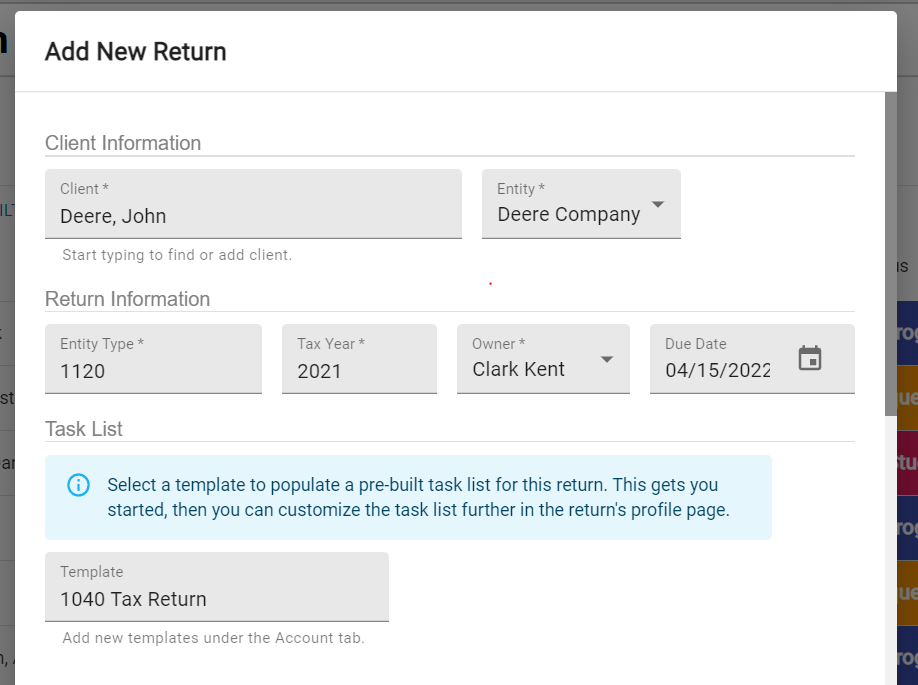
Fill out the following fields in the form:
- Client - The client whose return you are working on.
- Entity - The client can have multiple Entities you create returns for, see Entities. If the client has more than one you will need to select which entity the return will be for.
- Type - The type of return you are creating. Usually, this would be a 1040, 1120, or another type of tax return filing form. You can input any value if you would like to track other non-tax related work in TaxFlow, however.
- Year - The time period for the return. Ex (2021, 2021-Q1, etc)
- Owner - Who in your firm is currently assigned to the Return.
- Due Date - A custom due date.
- Template - The templated task list you will complete for the Return, see Templates.
4. Click Save and your new Return will be created.